Facebook · Guide
How to See How Many Followers You Have on Facebook
Facebook tucks your follower count a few menus deep, and once an account grows it only shows a short number like 1.2K. For a Page the full number is public: Facebook's own Page plugin showed 174,444,350 for Cristiano Ronaldo at 21:13 UTC on 24 September 2026.
First, a quick check of what you have. On a regular profile, your friends follow you automatically when you become friends. People who are not your friends can follow you only with pro mode on, or on older profiles that still have the Public follower setting, which Facebook is removing. A Page always has followers, and since Facebook replaced Page likes with follows, followers is the number that counts for a Page too.
All steps below come from Facebook's own help center as it read on 24 September 2026. Facebook moves menus around often, so each section links to the help page it is based on.
Advertisement
On your profile
Facebook's steps for a computer, from its page on follower settings:
- Go to your profile.
- Click More below your cover photo.
- Click Friends.
- Click Followers.
Two things trip people up here. If you have no followers, the Followers option is simply not there. And the list leaves out friends who follow you, so it only shows people who follow you without being your friend. That is why the list can look much shorter than you expect.
With pro mode on, your profile works more like a Page: people who are not your friends can follow you, and you get content and audience insights. Facebook's pro mode page says turning it on sets Who can follow me to Public.
On a Page
For a Page you manage, from Facebook's page on Page followers:
- Log into Facebook and click your profile photo in the top right.
- Click See all profiles and pick the Page.
- From the Page's Feed, click the Page name in the left menu.
- Click the Followers tab below the cover photo. You may need to click More first.
In the app it is the same idea: switch into the Page from the menu, tap the Page name, then tap Followers below the Page photo. For growth over time, Facebook's insights page gives these steps: Professional dashboard, then Insights, then Audience. The same page says Professional dashboard has changed and now shows up as Creator Dashboard or Business Dashboard, so look for one of those names.
Why Facebook shows 1.2K and not the exact number
If your follower count reads 1.2K or 45K, you are looking at Facebook's short form, which it uses once an account gets bigger. Facebook's help center does not explain when or how it rounds, and we found no page about it when we checked on 24 September 2026. It is a display choice. The full number still exists, and Facebook shows it in one public place: the Page plugin, the box websites use to embed a Page.
Facebook's Page plugin
174,444,350
Cristiano Ronaldo, 21:13 UTC
Our Facebook counter
174,444,350
Same Page, 21:13 UTC
Both read on 24 September 2026. The two numbers match to the last digit.
They are not always identical. We read the plugin 4 times that evening. The first reading is the one above; the other 3 were 3 to 8 followers away from our counter's nearest reading. At 21:24 UTC the plugin said 174,444,341 while our reading from the same second was 174,444,333, most likely because the two refresh at different moments.
| Plugin read at | Page plugin | Our counter | Our reading at |
|---|---|---|---|
| 21:13 UTC | 174,444,350 | 174,444,350 | 21:13 UTC |
| 21:15 UTC | 174,444,334 | 174,444,337 | 21:16 UTC |
| 21:24 UTC | 174,444,341 | 174,444,333 | 21:24 UTC |
| 22:11 UTC | 174,444,494 | 174,444,490 | 22:10 UTC |
A few followers either way is timing. The short number on Facebook and the full one on our counter are the same count, one of them rounded.
See the exact number live
- Open the Facebook follower count page.
- Type the Page name or paste its link, then press Show count.
- Leave the tab open. The count is checked every 2 seconds, and the chart under it records every change while you watch.
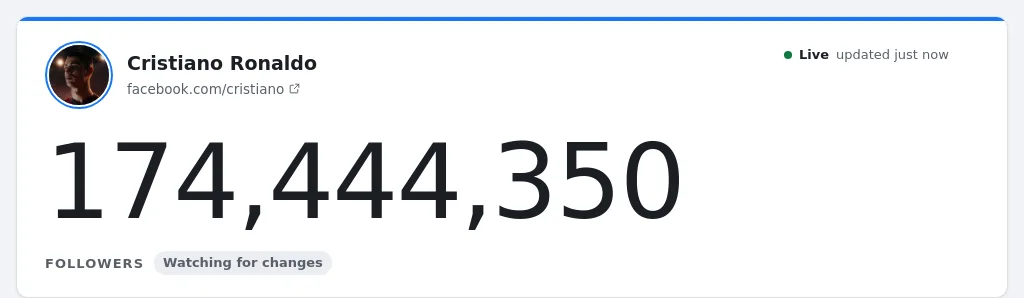
Under the counter you get an embed code, a link for OBS and a compare button, so you can put the count on a website or a stream, or race two Pages against each other.
At 22:10 UTC: 174,444,490 followers for Cristiano Ronaldo. Open the live count
Followers vs friends vs Page likes
- Friends go both ways: you send a request, they accept. Every friend also follows you, unless they choose to unfollow.
- Followers go one way. Your posts may show up in their Feed, and that does not put their posts in yours. On a regular profile your followers are normally your friends; with pro mode or a Page, anyone can follow.
- Page likes are on their way out. Facebook replaced them with follows and says you can no longer see who likes your Page, only who follows it. Some Pages still show a like button while it is being removed.
Advertisement
Why your count went down
Counts drop for ordinary reasons: people unfollow, unfriend you or leave Facebook. Two causes are bigger than people expect:
- Turning off pro mode. Facebook's pro mode page is clear: you lose every follower who is not your friend, and Who can follow me goes back to Friends. Turn pro mode on again to allow public followers.
- The end of public followers on regular profiles. Facebook is removing the Public follower option from regular profiles, gradually. If you had public followers and do not pick an option, Facebook turns pro mode on for you to keep them.
Big accounts lose followers too, all the time. We logged Cristiano Ronaldo's Page once a minute for 61 minutes. By 21:22 UTC it had lost 45 followers compared with the first reading, and it ended 123 up:
Change in Cristiano Ronaldo's Facebook followers
Show the numbers
| Time (UTC) | Followers |
|---|---|
| 21:09 | 174,444,367 |
| 21:14 | 174,444,349 |
| 21:18 | 174,444,323 |
| 21:23 | 174,444,331 |
| 21:28 | 174,444,362 |
| 21:33 | 174,444,362 |
| 21:38 | 174,444,371 |
| 21:43 | 174,444,373 |
| 21:48 | 174,444,407 |
| 21:53 | 174,444,422 |
| 21:58 | 174,444,461 |
| 22:03 | 174,444,484 |
| 22:08 | 174,444,499 |
| 22:10 | 174,444,490 |
A window of 61 minutes is far too short to say anything about a trend, and a shortened number like 174M would not have moved at all.
Can other people see your follower count, and can you hide it?
For a Page, the count is public: Facebook's own Page plugin shows it to anyone, without logging in. We found no setting in Facebook's help center that hides the number itself. What you can control:
- Who can follow you. On a regular profile it is normally friends only. Turning pro mode off removes everyone else.
- Who sees who you follow. Go to Settings and privacy, Settings, then Followers and public content, and set Who can see the people and Pages you follow? Facebook's help page has the steps. This is your following list, not your follower count.
- Your list of followers. The same help page mentions that people may choose to make their list of followers visible on their profile. It does not say where that setting is, and on a Page the count stays public either way.
- Individual followers. Facebook's advice for someone you do not want following you is to block them.
If you want to see your own number more often than Facebook shows it, the live counter works for any public Page, including yours.
Where the numbers and rules come from
- Follower readings: Cristiano Ronaldo's Page, once a minute from 21:09 UTC to 22:10 UTC on 24 September 2026, from the same Facebook data our counter shows.
- Page plugin numbers: read from Facebook's Page plugin (facebook.com/plugins/page.php) at the times given in the text.
- Steps and rules: Facebook Help Center pages facebook.com/help/201148673283205, facebook.com/help/843537565758741, facebook.com/help/810929305732263, facebook.com/help/2978174759158711, facebook.com/help/401227106619293, all checked on 24 September 2026.
Advertisement