Streaming · Guide
How to Run a 24/7 Live Subscriber Count Stream
A stream that shows nothing but a live sub count sounds odd until your channel is a week away from a milestone. This is how we would set one up: the overlay, the OBS settings, and how to keep it running when your own PC is off.
Most things that go wrong with these streams are boring: a counter that freezes at 3 a.m., a PC that reboots for an update, a stream that drops and never reconnects. A few settings prevent nearly all of it.
The steps below work for YouTube, Twitch, Kick and TikTok counters. The screenshot uses YouTube, the most common case.
Advertisement
What you need
- OBS Studio. It is free and runs on Windows, macOS and Linux.
- A counter overlay link. Our OBS overlay builder makes one for YouTube, Twitch, Kick, TikTok, Instagram and more.
- Your stream key from YouTube Studio, the Twitch dashboard or Kick.
- A background for the scene: a picture, your channel art or a plain colour.
- Music you are allowed to stream, or none at all.
- A computer that can stay on around the clock. More on that below.
Add the counter to OBS as a browser source
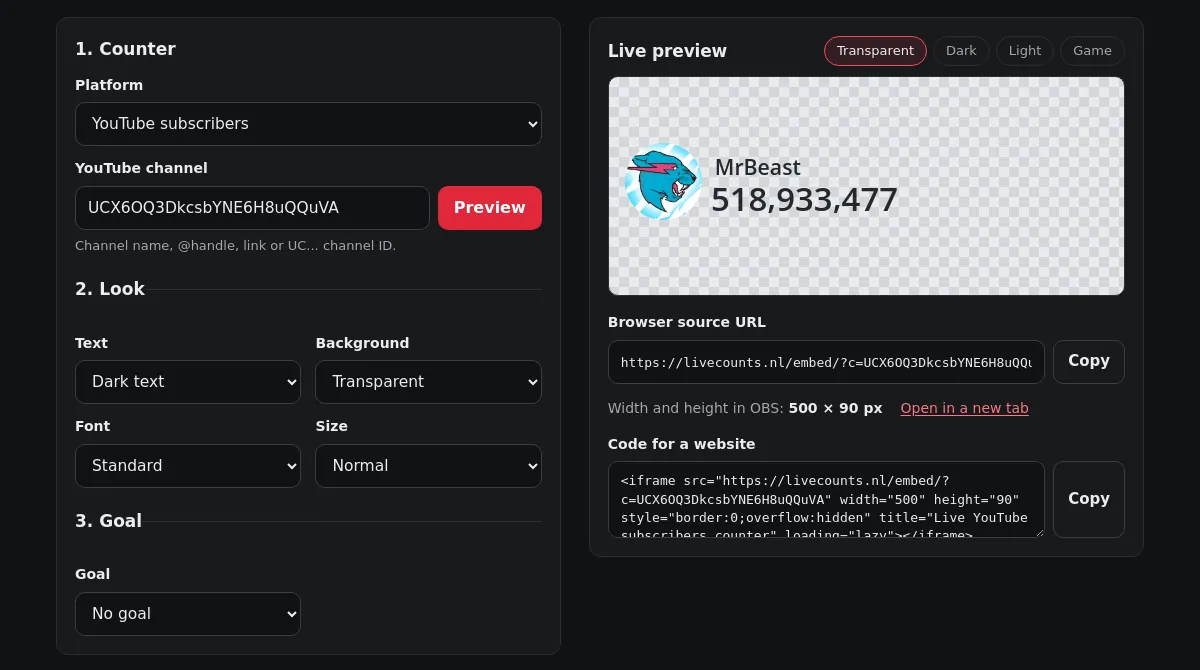
- Open the OBS overlay builder. Pick the counter, for example YouTube subscribers, and type your channel name, @handle or link. Press Preview.
- Choose how it looks: text colour, a transparent or solid background, the font and the size. Add a goal bar if the stream is about reaching a number.
- Copy the browser source URL under the preview. Note the width and height shown next to it.
- In OBS, click + under Sources, pick Browser, give it a name and paste the URL. Enter the width and height from the builder.
- Leave Shutdown source when not visible off, so the count keeps running when you switch scenes.
Need it bigger? Pick a larger size in the builder instead of stretching the source in OBS, so the digits stay sharp. The overlay never shows ads.
YouTube only publishes rounded subscriber counts, so a live YouTube number is an estimate between YouTube's own updates. Twitch, Kick and TikTok counters show the exact count the platform reports.
Settings for a counter stream
A counter scene is mostly a still picture with a few digits that change. It needs far less than a game stream, and lower settings mean fewer things that can fail overnight. This is what we would use:
| Setting in OBS | Value | Why |
|---|---|---|
| Base and output resolution | 1280 × 720 | Sharp enough for text, light on the encoder |
| Frame rate | 30 | The rolling digits need it; 60 adds nothing here |
| Encoder | x264, or NVENC or QuickSync if you have them | Hardware encoders leave the CPU free |
| Rate control | CBR | Platforms prefer a steady bitrate |
| Bitrate | 2,500 to 3,000 Kbps | Plenty for a still scene at 720p |
| Keyframe interval | 2 s | What YouTube and Twitch ask for |
| Audio | 128 Kbps AAC | Enough for background music |
The overlay itself costs very little. We loaded our YouTube overlay in headless Chrome, which is the same engine as OBS's browser source, and measured it for 10 minutes:
- CPU time
- 0.5%
- Requests per minute
- 30
- First load
- 80 KB
CPU time of the page as a share of one core, and network requests after the first load. Measured over 10 minutes up to 15:04 UTC on 24 September 2026.
The overlay asks for a fresh number every 2 seconds. Each answer is about 1.2 KB with headers, so even without any caching that is at most 35 KB a minute, around 49 MB a day. The video stream is the real cost: at 2,500 Kbps you upload a little over 1 GB an hour, so check that your internet plan has no upload cap.
Advertisement
Keeping it online 24/7: home PC vs a VPS
Your own PC
It costs nothing extra up front, and for a weekend milestone stream it is fine. For weeks on end, four things get in the way. Power: a PC that draws 60 watts around the clock uses 60 × 24 × 30 = 43.2 kWh a month, about €13 at €0.30 per kWh. Updates: Windows restarts for updates on its own schedule unless you pause them. Sleep: power settings that put the screen or the PC to sleep stop the stream. And your upload: the stream shares it with everyone else at home.
If you go this way, set Windows to never sleep, pause updates for the length of the stream, and turn on automatic reconnect in OBS (see troubleshooting below).
A streaming VPS
A server in a data center that runs OBS for you. You set up the scene once over remote desktop, start the stream and switch your own PC off. Space-Node's streaming VPS comes with OBS Studio installed. The plans, checked on 24 September 2026:
| Plan | Made for | Price | For a counter stream |
|---|---|---|---|
| Stone | 480p at 1 fps | €9.99/mo | Works if you accept that the digits jump once a second instead of rolling |
| Gold | 720p at 30 fps | €19.99/mo | The one we would pick: smooth rolling digits at 720p |
| Platinum | 1080p at 30 fps, dedicated GPU | €29.99/mo | More than a counter needs. Worth it for real video |
Disclosure: Livecounts.nl and Space-Node share an owner.
YouTube rules to check for always-on streams
Counter streams are common on YouTube, but a few rules catch people out. Read the current versions in YouTube's help pages before you start; these are the ones that matter most for a counter stream.
- Music. Content ID also scans live streams. Copyrighted music can get the stream muted or taken down, so use music you have the rights to, or none.
- No full replay. YouTube only keeps streams up to 12 hours long as a video, so a 24/7 stream is live only.
- Titles and thumbnails. Say what the stream is. A title that promises something else counts as misleading metadata under YouTube's spam rules.
- Money. If you are in the Partner Program, a stream that only shows a counter can be judged repetitious content and lose its ads. Treat it as a milestone event, not an income source.
On Twitch a broadcast ends after 48 hours. With automatic reconnect on, OBS usually starts a new one on its own.
Troubleshooting
The counter is frozen
Right-click the browser source and choose Refresh. If it happens again, open the source's properties and tick Refresh browser when scene becomes active. On YouTube a number that sits still for a while can also just be YouTube: the public count only moves in steps.
The counter is blank
Open the same URL in a normal browser tab. If it is blank there too, the channel ID or username in the link is wrong; make a new link in the builder. If it works in the browser but not in OBS, check the width and height of the source.
The stream went offline overnight
In OBS, go to Settings, Advanced and turn on Automatically Reconnect, with a retry delay of about 10 seconds and a high maximum number of retries. Then check the PC's power and update settings. On a VPS, check that the stream key did not change, and start OBS with the --startstreaming option so it goes live again by itself after a reboot.
OBS uses a lot of CPU
Lower the output to 720p at 30 fps, switch to a hardware encoder if there is one, and set the browser source's own frame rate to 30. A counter scene should not need more than a fraction of a modern CPU.
Where the numbers come from
- Overlay cost: our own test of /embed/?c=UCX6OQ3DkcsbYNE6H8uQQuVA in headless Chrome 121 for 10 minutes, at 15:04 UTC on 24 September 2026.
- OBS setting names: OBS Studio's Settings and browser source dialogs.
- Streaming VPS plans and prices: space-node.net/streaming, checked on 24 September 2026.
- Platform rules: YouTube's and Twitch's help pages. Rules change, so check the current version before you rely on them.
Advertisement