YouTube banner size checker
Check your channel banner against YouTube's size rules, see where the text and logo safe area falls, and download a correctly sized 16:9 image.
Channel banner
Check your banner
JPEG, PNG, WebP, GIF or BMP. Your browser reads the image; it is never uploaded.
Choose an image to check it.
Download a banner YouTube accepts
The template is 2,560 × 1,440 px with the safe area marked, ready to design on. The fit setting also changes the previews.
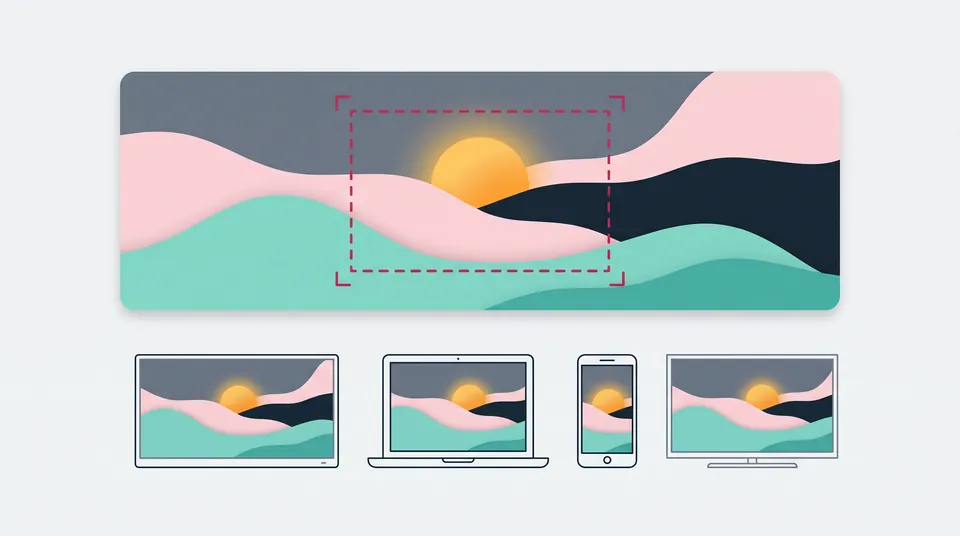
How it crops on each screen
Advertisement
How to check your YouTube banner
- Choose your banner image. The checks compare its pixel size, shape and file size with YouTube's guidelines.
- Keep the safe area overlay on and make sure your channel name, text and logo sit inside the dashed box.
- Look at the TV, phone and computer previews to see what each screen can cut off.
- Pick a size and how to fit the image, then download a JPEG or PNG. Starting from scratch? Download the blank template and design on it.
YouTube banner size requirements
| Rule | YouTube's guideline |
|---|---|
| Recommended size | 2,560 × 1,440 px, especially for TV |
| Minimum size | 2,048 × 1,152 px, aspect ratio 16:9 |
| Safe area for text and logos | 1,235 × 338 px at the minimum size (about 1,544 × 423 px at 2,560 × 1,440, scaled by this tool) |
| File size | 6 MB or smaller |
| Extras | No added shadows, borders or frames |
Source: YouTube Help, Manage your channel branding and Channel banner & profile picture tips, checked 19 November 2026. The pages differ slightly: the tips page recommends at least 2,560 × 1,440 px, while the branding page accepts 2,048 × 1,152 px as the minimum. Neither lists banner file types or crop sizes for computers, tablets or phones, so this tool marks only the documented safe area and labels the computer preview an estimate.
Making a video next? Check it with the YouTube thumbnail size checker.
Your image stays in your browser
Your browser reads the image and makes the downloads on your device. Nothing is uploaded or stored, and closing the tab clears it.
Frequently asked questions
What size should a YouTube banner be?
YouTube recommends 2,560 × 1,440 pixels, especially for TV. The minimum upload is 2,048 × 1,152 pixels in a 16:9 shape, and the file has to be 6 MB or smaller.
Where should I put text and my logo?
Inside the safe area in the middle of the banner: 1,235 × 338 pixels on a 2,048 × 1,152 image, or about 1,544 × 423 pixels on a 2,560 × 1,440 image. Phones and computers can crop everything outside it.
Why does my banner look cropped on my phone?
YouTube uses the same banner on computers, phones and TVs but shows it differently on each, and some views crop it. Only the safe area is meant to stay visible everywhere, so keep anything important inside it.
Should I upload a JPEG or a PNG?
YouTube's banner guidelines give a 6 MB limit but no file types. The JPEG download here is always kept under 6 MB. A detailed PNG at 2,560 × 1,440 can be larger, so the tool tells you instead of saving a PNG that is too big.
More free tools
Advertisement